
AI automation services

Less manual work. More room to move.

Practical AI automations that connect your tools, reduce repetitive work and keep your team in control.

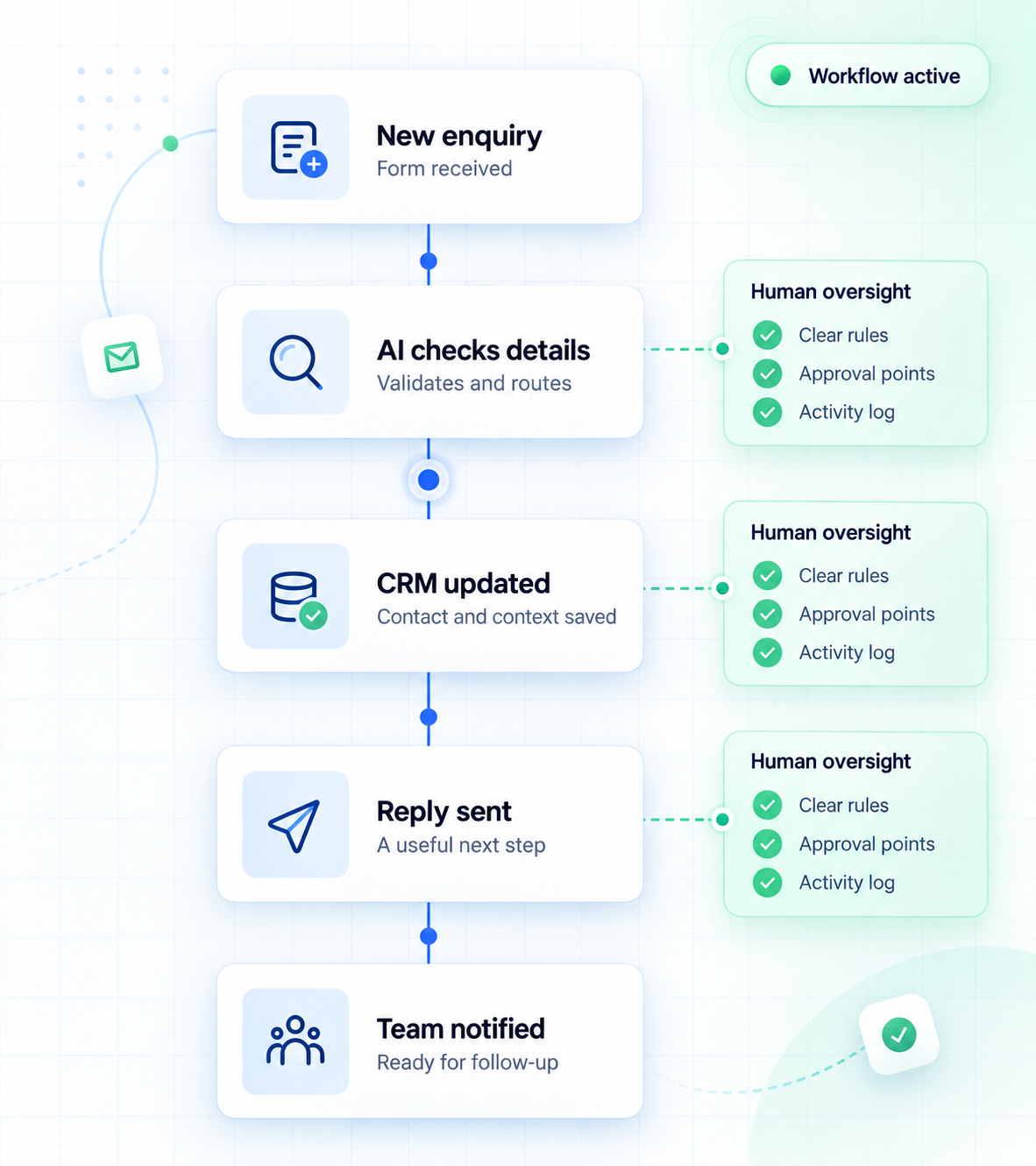
Illustrative workflow: enquiry received, details checked, CRM updated, reply sent and team notified, with human review points.
  • Practical by design

    Start with the work that takes time.

  • Human oversight

    Keep important decisions with your team.

  • Connected tools

    Bring your existing systems together.

  • Clear documentation

    Understand what runs and how it works.

A better way to work Less repetition. More attention.

Give your team its best hours back.

Your people have better things to do than move the same information from one tool to another.

Checking enquiries. Copying details. Sending updates. Small tasks become a daily workload when every step needs someone to move it forward.

We connect those steps into a practical workflow, using AI where it helps and clear rules where they work best. Your team can focus on the conversations and decisions that need their attention.

Find your starting point
Start with one repetitive process.
One enquiry. A different way forward.
The manual way

Every step
needs a hand.

  1. Open the enquiry
  2. Check the details
  3. Copy into your CRM
  4. Write a confirmation
  5. Update your team

You carry the process.

A connected flow

The routine
moves itself.

  1. Enquiry comes inCaptured in one place
  2. Details organisedAI assists; rules guide
  3. Tools stay updatedCRM, confirmation, team
  4. Your team takes overReview where it matters

You guide the outcome.

The starting point

Find the task your team repeats.
Then make the next step easier.

Our AI automation services

Practical automation.
For everyday work.

Enquiries, customer updates, reports and content. We connect the steps your team repeats, so they can spend more time on the work that needs them.

One useful workflow is a good place to begin.
From first enquiry to next step
New enquiryA conversation
worth following up.
Captured with context
01 Capture02 Organise03 Route to your team

01 Keep opportunities moving

Lead & enquiry automation

Bring new enquiries into one place, save the important details and let the right person know. Your team can follow up with the information they need.

A simple example Someone fills in your website form. Their details go to your CRM and your team receives a follow-up task.

Discuss enquiry automation
Keep the conversation connected
Customer

What happens next?

A useful update

Your enquiry is with our team.
We’ll be in touch with the next step.

The right update, at the right moment.

02 Make every handoff clearer

Customer communication

Keep customers informed with timely confirmations, reminders and updates. Routine messages follow agreed rules; questions that need a person reach your team.

A simple example A customer books an appointment. They receive a confirmation and a reminder before the meeting.

Plan a communication flow
Bring the useful information together
FormsCRMSheets
Team briefing
A clearer view
of what needs attention.
UpdatesCollected
ExceptionsFlagged for review
Next stepsShared with your team

03 Spend less time assembling updates

Operations & reporting

Bring updates from your everyday tools into one useful summary. Reduce repeated copy-and-paste work and highlight the details your team needs to check.

A simple example Each week, enquiry data is collected into a report with missing details flagged for review.

Simplify a recurring process
More room for the original thinking
01 / DraftStart with
a useful idea.
02 / ReviewAdd your
point of view.
Your approval comes before publishing.

04 Support the work behind the content

Content workflows

Turn approved ideas and source material into organised drafts. Keep research, feedback and approvals moving, with your team checking facts and making the final decisions.

A simple example A brief becomes a first draft, then moves to your reviewer before anything is published.

Build your content workflow

Illustrative workflows. Integrations, permissions and review points are agreed around your tools.

Not sure where to begin?

Tell us what your team keeps repeating.

We’ll help you identify a practical first workflow.

Find your starting point

Before we automate

Good questions.
Clear answers.

What can you connect? Where does AI help? Who stays in control? Here’s a practical place to start.

Getting started

Find the right first step.

Where should we start with automation?

Start with one task your team repeats often: copying enquiry details, sending routine updates or putting together a weekly report. A useful first workflow has a clear starting point, a predictable next step and someone responsible for the outcome.

Tell us how you handle it today, which tools are involved and where work gets held up. That gives us a practical starting point for deciding what to automate.

Can you work with the tools we already use?

Often, yes. We first check whether your website, CRM, email platform and other tools support the connections the workflow needs. This may depend on their integrations, APIs, permissions and subscription plans.

You do not need to replace everything to explore automation. If a connection has limits, we explain those before agreeing the scope.

Do we need technical knowledge to get started?

No. You need to understand your process, not the technology behind it. Show us what happens when a task comes in, what your team does next and what a good outcome looks like.

A short screen recording, an example form or a walk-through of a recent task can be enough to begin the conversation. Use sample or anonymised information when sharing examples.

How much does an automation project cost?

The cost depends on the number of steps, the tools involved, the condition of your data and how much testing or custom development is needed. A straightforward form-to-CRM connection has a different scope from a process with several approval stages.

Before work begins, the proposal should make the build cost, any ongoing support and third-party charges clear. AI usage, messaging and software subscriptions may have separate recurring costs.

Building it right

Useful automation, with clear boundaries.

How long does it take to build a workflow?

Timing depends on the workflow’s complexity, access to your tools and how quickly decisions and test feedback can be provided. More integrations, unusual exceptions and multiple reviewers usually require more work.

We agree milestones after reviewing the process, including time for testing and handover. Starting with a focused first version can make the project easier to review before expanding it.

Will AI replace our team or make decisions for us?

The aim is to reduce repetitive work and give your team better information. Automation can prepare a draft, organise an enquiry or send an agreed update. Your team can keep responsibility for judgement, relationships and important approvals.

We define which actions can run automatically and which need a person to review them. Those boundaries should be part of the workflow from the beginning.

Does every workflow need AI?

No. Many tasks work well with straightforward rules: when a form arrives, create a contact; when an appointment is booked, send a confirmation.

AI may help where the input varies, such as summarising a message, sorting enquiries or preparing a first draft. We use it where it adds value and include checks because AI output can be incomplete or incorrect.

How are privacy and access handled?

Before connecting tools, we agree what information the workflow needs, where it will go and who should have access. Permissions should be limited to the actions required, and sensitive information should be excluded wherever possible.

Data handling also depends on the platforms and AI providers involved. Their storage, retention and processing settings need to be reviewed against your requirements. Raise any restrictions early so they can shape the design.

After launch

Know what runs, what needs review and who owns it.

Can we test the automation before it goes live?

Yes. Testing should cover normal tasks as well as missing details, duplicate entries and failed connections. Your team should review the outputs and confirm that the workflow does what was agreed.

Where the tools allow it, we use test accounts or sample data and keep customer-facing actions paused during checks. The testing and launch approach is agreed as part of the project.

What happens if a connection fails or AI gets something wrong?

We plan how the workflow should handle failures: what can be retried, what should stop and who needs to be notified. Repeated actions, such as creating contacts or sending messages, need checks to reduce accidental duplicates.

AI-generated content or uncertain results can be routed for human review. No automation is error-free, so the scope should include suitable checks and a clear way to investigate problems.

Who owns the accounts and can we change the workflow later?

Account ownership, access and handover should be agreed before the build. Where practical, the workflow runs in accounts your business controls, with the access and documentation needed to understand it.

Changes are usually possible, but their effort depends on the tools and the change itself. Adding another notification is different from connecting a new system. Custom work, licences and any ongoing management should be covered in the project agreement.

What support do we need after launch?

That depends on how important the workflow is and how often your tools or process change. Some teams need a documented handover; others need ongoing monitoring, maintenance and improvements.

Agree who checks failures, manages subscriptions and requests changes. Support coverage, response times and maintenance costs should be confirmed in the proposal rather than assumed to be included.

You don’t need all the answers before you begin.
A real task is a useful place to start.

Scroll to Top