
The content plan looks excellent on the first day of the month.
There are five posts each week, three videos, a customer story, an article, two campaigns and a list of timely ideas. By the second week, a project becomes urgent. The person who approves captions is unavailable. Product photographs arrive late. One video takes longer to edit than expected. The calendar quietly becomes a record of missed deadlines.
This does not always mean the team lacks discipline. Often, the plan was created for an imaginary version of the business—one with unlimited ideas, immediate approvals and people waiting to produce content all day.
A maintainable monthly content plan begins with capacity. It chooses a small number of useful themes, defines what can realistically be created, gives each person a clear responsibility and leaves space for real work to change. The objective is not to fill every date. It is to create a dependable rhythm that helps the audience understand and trust the business over time.
This guide shows you how to build that system. It includes a capacity calculation, content-theme framework, four-week production workflow, approval process, practical calendar and review method that can work for a small business, founder-led brand or compact marketing team.
The short answer
To build a monthly content plan you can maintain:
- Decide what content must help the business accomplish.
- Choose one primary audience for the month.
- Set a publishing level based on real production capacity.
- Select three to five recurring content themes.
- Collect ideas from customer questions and current work.
- Give each post a purpose, format, owner and deadline.
- Produce content in small batches rather than at the last moment.
- Use one approval path with a clear response time.
- Keep a reserve of evergreen ideas for disrupted weeks.
- Review usefulness and business signals before planning the next month.
The best plan is not the one with the most posts. It is the one the team can complete without reducing every idea to generic filler.
A content plan is not only a calendar
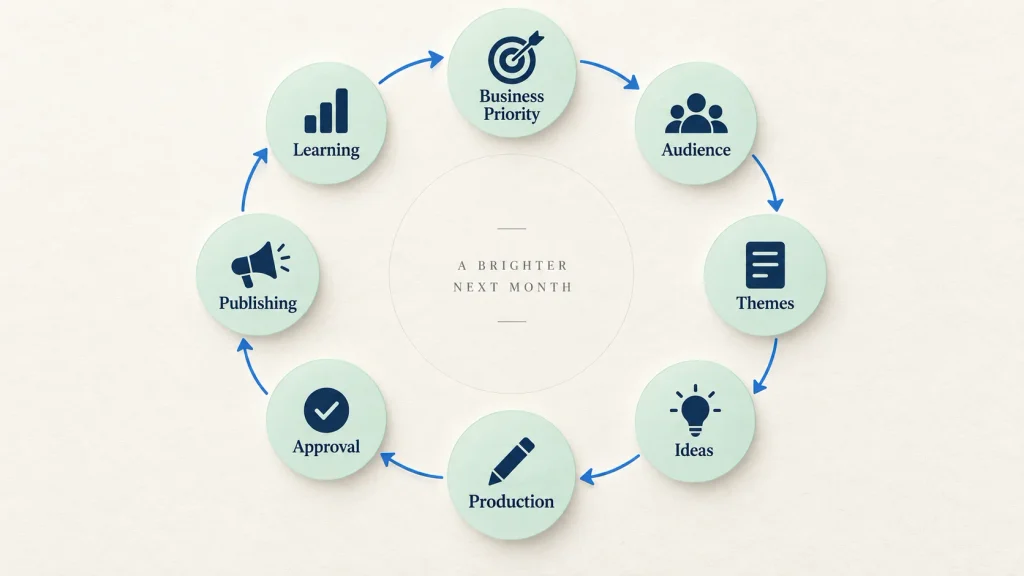
A calendar tells you when something should be published. A content plan explains why it deserves to exist, whom it is for, what it should communicate, who will produce it and what should happen after publication.
If the plan contains only dates and formats—“Monday Reel, Wednesday carousel, Friday offer”—the team still has to invent the subject, angle, evidence and message each week. The planning work has merely been postponed.
A useful monthly content plan contains five connected layers:
| Layer | Question it answers |
|---|---|
| Business purpose | What should content help the business achieve? |
| Audience | Whose questions and decisions are we supporting? |
| Themes | Which subjects should the business become known for? |
| Production | Who creates, reviews and publishes the work? |
| Learning | What will we examine before planning again? |
The calendar sits inside this system. It is not the system by itself.
Start with one business priority for the month
Content can support several goals, but a monthly plan becomes stronger when one priority receives extra attention.
The priority may be:
- introducing a new service;
- helping customers understand an existing offer;
- supporting a product collection or admissions period;
- demonstrating expertise in a focused subject;
- improving the quality of enquiries;
- building trust in the founder or team;
- answering questions that repeatedly delay decisions;
- directing interested people to a new website resource.
Write the priority in plain language:
This month, our content should help [audience] understand [subject or offer] so they can [useful next step].
For example:
This month, our content should help owners of service businesses understand what to prepare before starting a website so they can approach the project with a clearer brief.
This does not mean every post becomes an advertisement for the same service. The priority gives the month a direction. Customer questions, project decisions, process content and offers can approach it from different angles.
If the business is still uncertain what it should discuss publicly, start with What Should Your Business Post on Social Media?. It explains how customer questions, work, expertise, perspective, people and offers can become practical content pillars.
Choose the audience for the month
Many businesses speak to customers, partners, candidates, existing clients and the general public from the same account. That can be appropriate, but every post cannot serve all of them equally.
Choose the audience most connected to the month’s priority. Describe the situation they are in, not only their age or job title.
Weak audience description:
Small-business owners aged 25 to 45.
More useful description:
Owners of growing service businesses who rely on referrals but need a clearer website before they begin wider marketing.
The second description suggests real questions: What should the website explain? Which pages are required? What content must be prepared? How should enquiries be handled? Those questions can support a connected month of useful material.
A clear audience also helps the team reject unrelated ideas. An interesting topic is not automatically useful for the people the month is designed to help.
Calculate capacity before deciding frequency
Publishing frequency should come from production capacity—not from what another brand appears to be doing.
List the people and time genuinely available for:
- finding ideas;
- interviewing specialists;
- writing;
- design;
- filming;
- editing;
- factual review;
- approval;
- scheduling;
- responding after publication;
- reporting and learning.
Do not count the same hour several times. If the founder has two hours each week for content, those hours cannot simultaneously cover scripting, filming, reviewing and community response.
Estimate the work by format
Create a simple internal estimate based on your team’s real workflow. Do not copy these numbers as universal standards; measure your own production.
| Format | Work to include in your estimate |
|---|---|
| Text post | Idea, draft, review, formatting and publication |
| Single graphic | Copy, layout, design review, export and accessibility text |
| Carousel | Outline, slide copy, design, proofreading and export |
| Short video | Concept, script, setup, filming, editing, captions and review |
| Article | Research, structure, writing, editing, visual support and publishing |
| Project story | Permission, asset collection, context, writing, design and approval |
After estimating, reduce the planned output slightly. The remaining capacity protects the month from revisions, urgent work and opportunities that could not be predicted.
Three practical capacity levels
These are starting models, not rules.
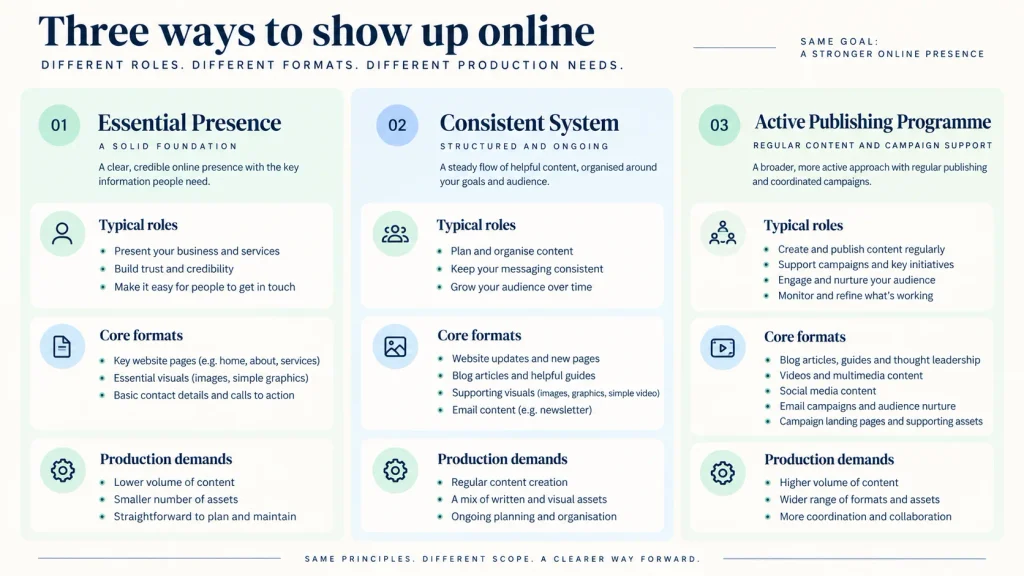
Level 1: Essential presence
Suitable for a founder or very small team with limited production time.
- 4 to 6 strong posts per month
- One or two repeatable formats
- One primary platform
- Mostly evergreen questions, work and expertise
- One offer-related post when relevant
Level 2: Consistent system
Suitable for a small team with defined writing and design support.
- 8 to 12 posts per month
- A mix of text, graphics, carousels and occasional video
- One primary platform and selective adaptation elsewhere
- Regular capture of customer questions and current work
- Monthly review and content reserve
Level 3: Active publishing programme
Suitable when the business has dedicated content roles, reliable specialists and faster approvals.
- 12 or more planned assets per month
- Recurring video, articles or campaign content
- Platform-specific adaptations
- Strong asset and approval management
- Ongoing performance review and content refresh
Do not select Level 3 because it sounds ambitious. Select it only when the operating system exists. A reliable Level 1 plan creates more value than a Level 3 calendar that collapses every month.
Choose three to five content themes
Themes give the month coherence without forcing every post to repeat the same topic. They should connect the audience’s questions with the business’s actual knowledge.
For a creative and digital agency, a monthly theme set might be:
- Customer questions — decisions people need help making
- Work and process — how projects are approached and reviewed
- Practical expertise — checklists, comparisons and explanations
- Point of view — principles that guide the work
- Offers and next steps — who the service is for and how to begin
For a fashion brand, the themes may be product detail, styling, care, founder selection, customer questions and new arrivals. For a university, they may be programme clarity, faculty expertise, student work, admissions guidance, campus life and institutional updates.
Keep themes broad enough to generate several ideas but specific enough to guide decisions. “Education” is too broad. “Questions students ask before choosing a technology programme” is usable.
Use a monthly focus inside stable themes
The themes can remain stable while the focus changes.
| Stable theme | Monthly focus example |
|---|---|
| Customer questions | Website planning questions |
| Work and process | How discovery changes the project direction |
| Practical expertise | Content and asset preparation |
| Point of view | Clarity before visual complexity |
| Offer | Website and landing-page projects |
This gives the account a recognisable identity while allowing the content to move with business priorities.
Build an idea bank before building the calendar
Do not ask the calendar to create ideas. Collect them from the business first.
Useful sources include:
- questions from enquiries and sales calls;
- problems solved during current work;
- decisions explained to customers;
- mistakes the team helps prevent;
- comparisons customers find difficult;
- product or service details people overlook;
- feedback and objections;
- internal process improvements;
- website search terms and article questions;
- upcoming launches, events or deadlines;
- useful points of view from founders or specialists.
Record each idea with enough context:
| Field | Example |
|---|---|
| Raw idea | Customers ask whether they need a website or landing page |
| Audience | Founder preparing a first campaign |
| Useful point | Choose according to the visitor’s decision, not page count |
| Evidence | Project-planning framework and illustrative scenarios |
| Possible format | Comparison carousel or short video |
| Destination | Detailed website-versus-landing-page article |
| Reviewer | Web strategy lead |
One strong customer question can produce several distinct pieces when the angles genuinely differ. How to Turn One Customer Question into Five Useful Posts gives a complete method and ready-to-use example.
Score ideas before scheduling them
An idea should not enter the calendar simply because someone suggested it first.
Score or discuss each idea using five questions:
- Relevance: Does the intended audience care about this now?
- Usefulness: Will the post help someone understand, decide or act?
- Business fit: Does it connect to the expertise or offer honestly?
- Evidence: Do we have a real answer, example, process or asset?
- Feasibility: Can we produce and approve it at the required quality?
You can use a simple High, Medium or Low rating. Avoid false precision. The objective is to prevent easy but weak ideas from displacing useful ones that require modest preparation.
An idea with high relevance but no evidence may need an interview. An idea with strong evidence but low current relevance can remain in the evergreen reserve. A time-sensitive idea with no available owner should not be scheduled as though capacity will appear later.
Give every post a job
A balanced monthly plan supports more than reach. It helps people move from recognition to understanding, trust and action.
Use four communication jobs:
Recognise
Name a situation the right audience already experiences.
Example: “Your team may not have an idea problem. It may have an approval problem.”
Understand
Explain the cause, options, process or decision criteria.
Example: a carousel showing the difference between a content theme and a post format.
Trust
Show real work, people, decisions, process or evidence.
Example: how the team turns one sales question into an approved content series.
Act
Offer a relevant next step such as reading a guide, viewing work, checking a product, registering or beginning a conversation.
Example: invite a prepared prospect to discuss a content system.
Not every post needs all four jobs. The monthly mix should avoid staying at only one stage. A feed made entirely of recognition posts may attract attention without explaining the offer. A feed made entirely of direct promotion asks for action before earning understanding or trust.
Separate themes, formats and channels
These three are often mixed together:
- Theme: what the business repeatedly discusses
- Format: how one idea is expressed
- Channel: where the content is published
For example:
- Theme: customer questions
- Idea: website or landing page?
- Format: seven-slide comparison carousel
- Primary channel: Instagram
- Adaptation: concise LinkedIn text post
- Destination: detailed article
This distinction keeps the plan flexible. If filming becomes impossible, the theme and idea do not disappear; the team can select another appropriate format. If a platform is not producing useful audience signals, the content knowledge remains available for another channel or the website.
Do not cross-post every asset without adaptation. Keep the central idea and evidence, but adjust the opening, pacing, length, visual treatment and CTA for the environment.
Create a monthly content matrix
A matrix helps you see whether the plan has enough variation in subject and purpose before dates are assigned.
Here is a 12-post example for a service business:
| No. | Theme | Communication job | Idea | Format | Primary next step |
|---|---|---|---|---|---|
| 1 | Customer question | Recognise | Website or landing page? | Text post | Read comparison guide |
| 2 | Expertise | Understand | Five things to prepare before a website | Carousel | Save checklist |
| 3 | Process | Trust | How a project enquiry is reviewed | Short video | View contact process |
| 4 | Point of view | Understand | Start with the message, not animation | Text post | Read related insight |
| 5 | Work | Trust | Why one project used a landing page | Project breakdown | View relevant work |
| 6 | Customer question | Understand | Can we improve instead of rebuild? | FAQ graphic | Read diagnostic guide |
| 7 | Expertise | Understand | What affects website scope? | Carousel | Prepare project notes |
| 8 | People | Trust | Who reviews content accuracy? | Team post | Learn about approach |
| 9 | Offer | Act | Website planning conversation | Service-led post | Contact page |
| 10 | Process | Trust | From question to five posts | Diagram | Read content guide |
| 11 | Point of view | Recognise | A content calendar is not a strategy | Text post | Read this article |
| 12 | Monthly learning | Trust | One question the month clarified | Founder note | Follow next theme |
This is not a compulsory formula. A business with capacity for six posts should select the six strongest ideas, not compress twelve into lower-quality versions.
Turn the matrix into a four-week calendar
Assign dates only after the ideas, purposes and owners are clear.
Example publishing calendar
| Week | Tuesday | Thursday | Saturday |
|---|---|---|---|
| Week 1 | Customer question: website or landing page | Preparation carousel | Process video |
| Week 2 | Message-first point of view | Project breakdown | FAQ: improve or rebuild? |
| Week 3 | Website scope carousel | Team expertise post | Relevant service offer |
| Week 4 | Question-to-content diagram | Calendar point of view | Monthly learning note |
The days are examples, not universal recommendations. Select publishing days that fit your team’s production and response capacity. A post should not go live when nobody can monitor an important launch or respond to genuine enquiries.
Leave one or two open spaces in the month for:
- a useful question that appears during current work;
- an important business update;
- a timely industry development that can be verified;
- a delayed post that still deserves attention;
- rest when the team needs to protect quality.
An open space is not a failure to plan. It is planned flexibility.
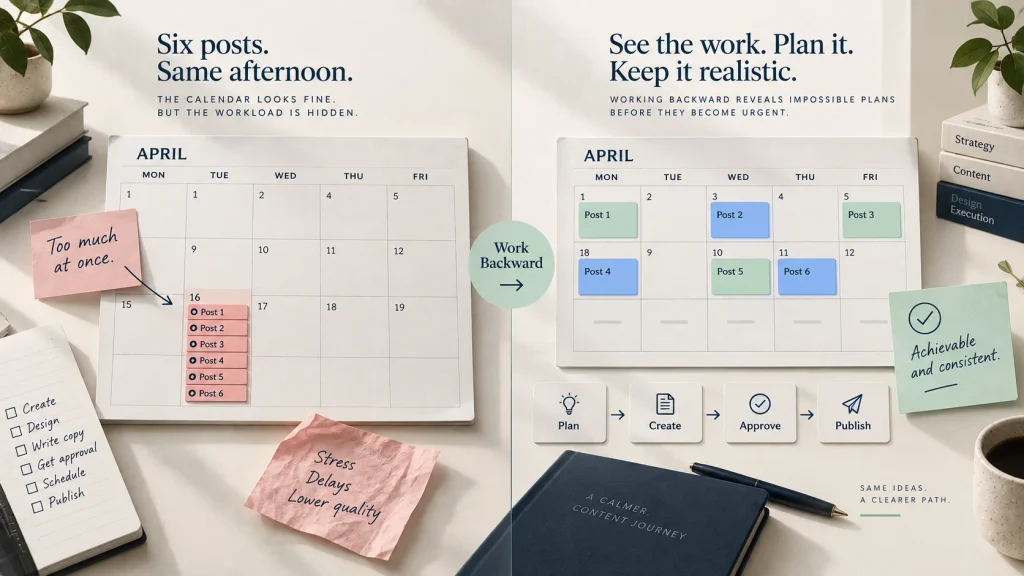
Work backward from publication
Every post needs more than a publication date. Add the dates when work must begin and decisions must be made.
For a carousel scheduled for Thursday:
| Stage | Example deadline |
|---|---|
| Idea and source approved | Previous Friday |
| Outline and slide copy | Monday |
| Factual review | Tuesday morning |
| Design | Tuesday afternoon |
| Final approval | Wednesday |
| Accessibility text and scheduling | Wednesday afternoon |
| Publication and response | Thursday |
The lead time should reflect your actual process. A simple text post may need less. A customer story, video or regulated claim may need much more.
Working backward reveals impossible plans before they become urgent. If six posts need approval on the same afternoon, the calendar has hidden the workload rather than organised it.
Build a weekly production rhythm
A stable rhythm reduces the number of daily decisions.
One possible schedule for a small team:
Monday: Select and brief
- Confirm the week’s priority posts.
- Review source material and facts.
- Assign owners and reviewers.
- Identify missing assets or permissions.
Tuesday: Write and structure
- Draft captions, scripts and carousel copy.
- Prepare design or filming briefs.
- Conduct short specialist interviews where needed.
Wednesday: Produce
- Design graphics and carousels.
- Film and edit videos.
- Prepare article or website destinations.
Thursday: Review and approve
- Check clarity, facts, permissions and brand consistency.
- Consolidate feedback.
- Complete accessibility and link checks.
Friday: Schedule and learn
- Schedule approved work.
- Respond to the week’s comments and enquiries.
- Record new questions.
- Review useful signals without overreacting to one post.
Your publishing days may differ. The value comes from separating selection, creation and approval instead of attempting all three an hour before publishing.
Batch the repeatable parts, not every creative decision
Batching can reduce setup time. Several short videos may be filmed during one session. A designer can prepare a group of approved carousels. Captions can be reviewed together.
However, batching becomes harmful when it forces every idea into the same structure. Ten videos recorded in one sitting may be efficient, but they will feel mechanical if each has the same hook, framing and conclusion.
Batch:
- interviews with one specialist;
- product photography setups;
- video recording sessions;
- proofreading;
- design exports;
- scheduling and metadata;
- recurring reporting.
Keep room for:
- different angles;
- current project lessons;
- platform-specific pacing;
- real human response;
- timely corrections;
- ideas that deserve a different format.
Efficiency should protect quality, not flatten it.
Create a simple approval system
Approval is one of the most common hidden bottlenecks in business content. The creator finishes on time, but several people leave comments in different places. One person changes the message, another changes the design and a final decision never arrives.
Define four roles:
| Role | Responsibility |
|---|---|
| Content owner | Maintains the calendar and moves work between stages |
| Creator | Writes, designs, films or edits the asset |
| Subject reviewer | Checks specialist facts, claims and missing context |
| Final approver | Decides whether the content is ready to publish |
One person may hold more than one role in a small business. The responsibilities should still be clear.
Use one review location
Feedback should live in one agreed place: the project board, document, design file or approval tool. Do not combine email, messaging applications, voice notes and hallway comments unless the content owner consolidates them.
Set a response deadline
An approver needs to know when feedback is required and what happens if it is late. Time-sensitive content may be cancelled rather than rushed. Evergreen content may move to the next available slot.
Ask for decision-quality feedback
“Make it more premium” does not identify the problem. Better feedback explains the audience or communication risk:
- The first slide does not identify who this advice is for.
- This result cannot be published without context.
- The CTA promises a consultation, but the form only sends a general enquiry.
- The image does not show the product scale accurately.
- This term is not how customers describe the service.
Limit unnecessary approval
Not every routine post requires the founder, legal adviser, sales head and designer to approve it. Create boundaries: which subjects can follow approved templates, which claims need specialist review and which announcements need leadership approval.
Create clear production statuses
Use a small number of statuses everyone understands:
- Idea captured
- Selected for month
- Brief ready
- In production
- In review
- Approved
- Scheduled
- Published
- Learning recorded
Avoid vague statuses such as “almost done” or “waiting.” State what is waiting and who owns the next action.
Every scheduled item should contain:
- title or central idea;
- audience;
- theme;
- purpose;
- format and channel;
- source material;
- writer or creator;
- reviewer and approver;
- production deadline;
- publication date;
- CTA or destination;
- final asset link;
- status;
- results or learning note after publication.
This makes the calendar useful to the full team rather than readable only by the person who created it.
Build an evergreen reserve
Some weeks do not go according to plan. A photo session is delayed. A customer cannot approve a project story. A product launch moves. An expert becomes unavailable.
Prepare a reserve of content that remains useful without a specific date:
- frequently asked questions;
- checklists;
- common comparisons;
- process explanations;
- terminology in plain language;
- principles and points of view;
- product care or preparation guidance;
- previously successful ideas that deserve a new angle;
- article excerpts that still match the current offer.
Keep the reserve prepared enough to publish, but review it before use. Contact details, product availability, regulations, platform instructions and business offers can change.
The reserve should not become a drawer of generic quotes. It should contain real, useful material with flexible timing.
Plan timely content without becoming reactive
Events, launches, seasonal needs and industry developments can make content more relevant. They can also consume the entire month if the team reacts to every trend.
Divide the plan into:
- Planned core: stable themes and important business priorities
- Timely layer: known events, launches and deadlines
- Responsive space: a small amount of capacity for genuine current relevance
Before adding a timely idea, ask:
- Does this matter to our audience?
- Do we have a useful and informed contribution?
- Can we verify the facts?
- Does the timing allow responsible production and review?
- Will publishing this strengthen or confuse our position?
Silence is often better than a forced trend with no connection to the business.
Connect social content to the website
Social media helps people discover and understand ideas, but deeper material and conversion paths should not depend entirely on a platform feed.
Plan destinations for posts that deserve them:
- insight articles;
- service pages;
- project or work pages;
- product pages;
- event registrations;
- downloadable resources;
- contact or enquiry pages.
The destination must continue the same promise. A post about a focused campaign should not send people to a broad homepage and ask them to search again. Website or Landing Page: Which Does Your Business Need? explains how to choose the correct destination.
If the website is being built or reorganised, What to Prepare Before Starting a Business Website helps the team gather the content, proof, images, functions and ownership required for a dependable foundation.
Maintain visual and verbal consistency
A monthly plan becomes easier to produce when the business has a small set of approved visual patterns and a clear writing direction.
The visual system may include:
- typography hierarchy;
- colour and contrast rules;
- image treatment;
- diagram and illustration style;
- carousel structure;
- video title and caption placement;
- logo usage;
- accessibility standards;
- export sizes and file naming.
The verbal system may define:
- tone;
- preferred terms;
- words or claims to avoid;
- sentence style;
- amount of technical detail;
- CTA approach;
- how examples and evidence are described.
Templates should remove repetitive production decisions without forcing every idea into the same appearance. If the business has only a logo and no wider system, Logo vs. Brand Identity: What Does Your Business Actually Need? explains the missing layers. A structured brand design brief can help a creative partner develop the system around real goals, audience and use cases.
The message should be settled before the content team tries to maintain consistency at speed. Before You Redesign Your Logo, Clarify Your Message provides a practical starting point for audience and positioning clarity.
Use AI without creating a generic calendar
AI can help organise captured ideas, identify missing content jobs, turn interviews into structured notes, draft variations and adapt an approved idea to several formats.
It cannot provide the business’s real experience unless the team supplies it.
Give the system:
- the month’s audience and priority;
- approved content themes;
- real customer questions;
- current project notes;
- verified product or service facts;
- the brand voice;
- existing articles and destinations;
- prohibited or sensitive claims;
- available production capacity.
Then ask it to organise, not invent.
A useful prompt might be:
Using only the verified source material below, organise a monthly content matrix for the stated audience and business priority. Give each idea one clear purpose, recommend the simplest effective format, identify missing evidence and flag any claim that needs review. Do not invent customer results, experiences or statistics. Keep the plan within the stated production capacity.
Human review remains necessary. AI can make an impossible calendar look beautifully organised. It cannot create the missing hours, approvals or real proof.
A realistic example: the six-post month
Consider a fictional specialist consultancy with one founder, one designer working part-time and no dedicated video editor. The founder can give two hours each week. The designer can support six assets per month. Approval happens on Thursday.
The team initially wants twelve posts, four videos and a monthly article. Capacity planning shows that this would leave almost no time for interviews, revisions, response or client work.
They choose six posts:
| Week | Content | Purpose | Format |
|---|---|---|---|
| 1 | A customer question about choosing a service | Recognise | Text post |
| 1 | Three factors that change the recommendation | Understand | Carousel |
| 2 | How the first review works | Trust | Simple founder video |
| 3 | One anonymised project decision | Trust | Project graphic and caption |
| 3 | Who the service is suitable for | Act | Offer post |
| 4 | One monthly lesson from customer conversations | Trust | Founder note |
The founder records the video and answers interview questions in one session. The designer uses two approved visual patterns. The content owner prepares drafts a week ahead. One evergreen FAQ remains ready if the project story is delayed.
The plan is smaller than the original ambition. It is also complete, responsible and repeatable. That makes it a stronger foundation for growth.
Review the month without chasing one metric
The review should ask what the content helped people do—not only which post received the most reactions.
Review signals by purpose:
| Content job | Useful signals |
|---|---|
| Recognition | Relevant reach, profile visits and audience quality |
| Understanding | Saves, completion, meaningful questions and article reading |
| Trust | Work-page visits, repeat viewers and references during enquiries |
| Action | Qualified clicks, contact visits, registrations, calls or enquiries |
| Production health | Completion rate, revision load, approval delays and team effort |
Production health matters. A high-performing post that required repeated late-night work may not be a sustainable model. A modest post that becomes a useful sales resource may have value beyond visible engagement.
At the end of the month, ask:
- Which questions attracted the right people?
- Which ideas helped customers understand the offer?
- Which format communicated the subject most clearly?
- Which posts supported real conversations or website journeys?
- Which production stage caused delays?
- Which approvals created unnecessary revisions?
- What should be repeated, improved, retired or tested?
- Which new customer questions entered the bank?
If social traffic reaches the website but does not progress, inspect the destination rather than only changing the posts. Why Your Website Gets Visitors but Few Enquiries explains how message, trust, mobile usability, calls to action, forms and follow-up affect the journey.
Build the next month from learning, not from zero
The next planning session should begin with the previous month’s evidence and unfinished opportunities.
Carry forward:
- strong questions that deserve another angle;
- comments that reveal missing explanations;
- useful formats the team can produce reliably;
- content that needs a deeper article or project example;
- evergreen posts that were delayed;
- repeated objections from sales;
- visual assets that can support a new idea;
- lessons about approval and workload.
Do not copy the calendar mechanically. Preserve what worked about the system while changing the themes and subjects according to the next business priority.
Content planning becomes easier when each month leaves behind a better question bank, clearer templates, stronger proof and more accurate capacity assumptions.
Common monthly content-planning mistakes
Planning for motivation instead of capacity
An ambitious meeting creates a large calendar, but nobody has protected the hours required to produce it. Begin with available roles and time.
Treating frequency as the strategy
Publishing three times a week is a schedule. The strategy explains whom the content serves, what the business should become known for and how the work supports a useful journey.
Choosing formats before ideas
The plan says “four Reels and four carousels,” so the team stretches weak ideas to fill the boxes. Choose the customer question or useful point first.
Giving every post the same purpose
A month of direct promotions asks for action without building understanding. A month of broad education may never clarify the offer. Use recognition, understanding, trust and action intentionally.
Creating the plan without the people doing the work
The calendar is approved before writers, designers, specialists or sales teams confirm the source material and effort. Involve them before dates become commitments.
Ignoring approval lead time
The production date is planned, but review is treated as instant. Assign reviewers and deadlines before creation begins.
Leaving no space for change
Every date is filled, so one delay disrupts the entire month. Preserve a small amount of responsive capacity.
Depending on one person for every stage
One person finds the ideas, writes, designs, posts, replies and reports. If that person becomes busy, the system stops. Simplify the plan, document the process and distribute responsibility where possible.
Measuring only public engagement
Likes do not show whether the right people understood the offer. Combine platform signals with website behaviour, enquiries and sales feedback.
Beginning each month with an empty idea bank
Content planning becomes exhausting when questions and work moments are not captured continuously. Build the source system between planning meetings.
Frequently asked questions
How many posts should a business publish each month?
There is no universal number. Select a frequency the team can produce, review and respond to without reducing quality. Four useful posts may be the correct starting point for a founder-led business, while a dedicated team can support a larger programme.
How far ahead should content be planned?
Plan stable themes, important campaigns and production several weeks ahead. Leave some capacity for genuine customer questions and verified current developments. A completely fixed three-month calendar can become outdated; a completely reactive calendar creates stress.
Should every month have a campaign?
No. Some months should strengthen understanding, trust and evergreen resources. Run a campaign when there is a defined audience, offer, destination and follow-up—not simply because a new month began.
How many content themes should we use?
Three to five stable themes are manageable for many businesses. Use enough variety to support the customer journey without creating categories the team cannot fill with real knowledge.
Should we post on every platform?
No. Begin with the channels where the relevant audience and your production strengths align. Adapt strong ideas selectively elsewhere. Several inactive or copied profiles are not automatically better than one useful presence.
What should we do when an approver is late?
Set the rule before it happens. Evergreen content can move to another date. Time-sensitive content may be cancelled. Use a reserve post rather than publishing unapproved claims or rushing the team.
How can a small business create content without a full marketing team?
Choose a smaller frequency, focus on one primary channel, use repeatable formats, capture customer questions continuously and batch only the work that benefits from batching. A founder can provide knowledge through short interviews while another person shapes it into content.
Should we schedule every post automatically?
Scheduling can improve consistency, but review every post for current accuracy and ensure someone is available to respond when necessary. Sensitive announcements and live developments may require manual publishing.
How often should the plan be reviewed?
Review production progress weekly and conduct a more complete learning review before the next month. Do not rewrite the strategy after every low-performing post; look for patterns across subjects, formats and audience response.
What should be included in a content calendar?
At minimum: central idea, audience, theme, purpose, format, channel, owner, reviewer, deadlines, publication date, source material, CTA, destination, asset link, status and learning note.
Build a rhythm the business can keep
A monthly content plan should reduce uncertainty, not create another source of pressure.
Begin with one business priority and one defined audience. Choose themes from real customer questions and real work. Set the publishing level according to the people and time available. Plan production and approval backward from each date. Leave room for the month to behave like a real month.
The plan does not need to look busy. It needs to help the business communicate useful ideas consistently, learn from the audience and improve the system over time.
Need a clear content direction and production rhythm your team can actually maintain? Discuss your content plan with Nothing Down.